QSR scheduling and operations, built for franchisees, not HQ.
 AI Assistant at the core
DohOps is a QSR scheduling and operations app for multi-unit franchisees: schedule every crew by position, clock in on a shared kiosk, prove line checks and food-safety logs with photos, and watch labor against your target at every store. $99/month for unlimited locations with 8 users included ($8 per extra user), DohOps AI included, set up in under an hour.
See DohOps run a quick-service restaurant
Click through a QSR week with sample data: DohOps AI drafting open shifts for the rush, opening line checks, fryer oil and cooler logs, hours for payroll and hiring.
Sample data with made-up names. Open the tour in a new tab →
How DohOps fits a QSR operation
Six ways DohOps maps to the rhythm of a quick-service franchise, from the 5 AM open to the midnight close.
Scheduling by position
Give each person their positions (drive-thru, register, grill, prep) and build the week by position, so you see who covers the lunch and dinner rush before it starts. Copy last week or apply a saved template, then publish to everyone's phone.
Labor against your target
Set a labor target % for each store and enter your sales. DohOps compares scheduled and actual labor with that target and sends an alert when a store goes over budget. Labor cost shows on the schedule while you build it.
Kiosk PIN clock-in
One shared tablet per store. Each person clocks in with a private 4-digit PIN, no personal phone needed. Limit the kiosk to your store's internet connection; wrong-PIN guesses are capped.
Line checks and food-safety logs
Ready-made restaurant checklists that fit a QSR: line check, a temperature log every 4 hours with a thermometer photo, fryer oil, date-and-label, prep list and delivery check-in, each with photo proof.
Opening and closing, with proof
Opening and closing checklists go to the right people, with a reminder before they are due. DohOps AI can score the photos against your example photo; a manager makes the final call in one Review Inbox, and a checklist rejected or sent back with the fix-it tick on (the default) becomes a fix-it ticket for the store, due in 24 hours.
Hiring with a QR code
Post a job and put the QR code on the counter. People apply from their phone without an account, every store's applicants land in one list, and DohOps AI can draft the posting for you.
Audit every store the same way, and get the misses fixed
Store audits with the ready-made Restaurant walk, a fix-it task with an owner and a due time, and a photo check that catches a bad photo while the crew is still on the line.
Store audits: the Restaurant walk
Start from the ready-made Restaurant walk or build your own weighted checklist. Each item is Pass, Fail or N/A or scored in points, with photos and notes, and food-safety items can be marked Critical. DohOps works out the score, answers lock when you submit, and you see every store's score and trend. A store manager can audit their own store between your visits.
A fix-it task for every miss
Each audit miss can make a fix-it ticket for the store, and so can a checklist rejected or sent back with the fix-it tick on (the default): the reason, due in 24 hours, assigned to the store manager and assistant manager. Closing it takes a short note.
Photo check before hand-in
On checklists that use DohOps AI, each photo is checked while the job is still open. If the thermometer photo may not show what the step asks for, the crew member sees a note and can retake it or keep it. It is never a score and never blocks the hand-in, and your reviewer sees if a flagged photo was kept.
What you can check in your first week
What you can see in DohOps within days of starting the free trial. No made-up results, just what the app shows you.
Who clocked in early, late or stayed
The clock-vs-schedule report shows early clock-ins, late arrivals and people who stayed past their relief, store by store, so you can approve or question extra time before payroll.
Every line check, with photos
See which opening, closing and line checks were done, by whom and when, with the photos, from one Review Inbox instead of driving store to store.
Labor against your target
Once you set a labor target and enter sales for each store, DohOps shows scheduled and actual labor side by side and flags the store that goes over.
One hiring list for every store
Applicants from every store's QR code land in one list with their answers, so no application sits forgotten in a manager's email.
The pain we built this for
Quick-service runs on speed, and labor is the biggest cost you can control. Staff the rush short and the drive-thru line backs up; staff it long and you pay people to stand around. Getting it right means knowing who works which position, every hour, at every store.
Many multi-unit QSR franchisees still build schedules in spreadsheets, send them to store managers, and let the crew find out by text. That works for one store. At three or four, nobody is sure which version is current, and the field visit always lands on the day the line check was skipped.
Food safety is the quiet risk. Temperature logs, fryer oil changes and date labels are easy to skip and hard to prove. DohOps can ask for a photo at each step, so the log shows what was actually done, not what someone remembered to tick.
DohOps was built by Vikas Sharma, a multi-unit operator who has spent 30 years turning struggling stores and hotels into top performers. He is a member of 7-Eleven's NBLC and ZLC and a former President of the Greater Austin 7-Eleven Franchise Owners Association, and his own stores run on DohOps today: see the numbers in the case study.
$99 a month covers unlimited locations and 8 users, with $8 for each extra user and DohOps AI included. One bill, one login, every store on the same system.
The core modules for QSR operators
Three modules that cover the quick-service day, from open to close.
Time & Attendance
Kiosk PIN or phone clock-in with a GPS radius check, break tracking, weekly and daily overtime, and a 7-year audit trail of every change.
Smart Scheduling
Build the week by position, copy last week or apply a saved template, see labor cost as you go, and publish to phones with a reminder an hour before each shift.
AI Job Assignments
Assign line checks, prep and deep-clean jobs. Staff send photo proof, DohOps AI can score the photos, and your manager makes the final call.
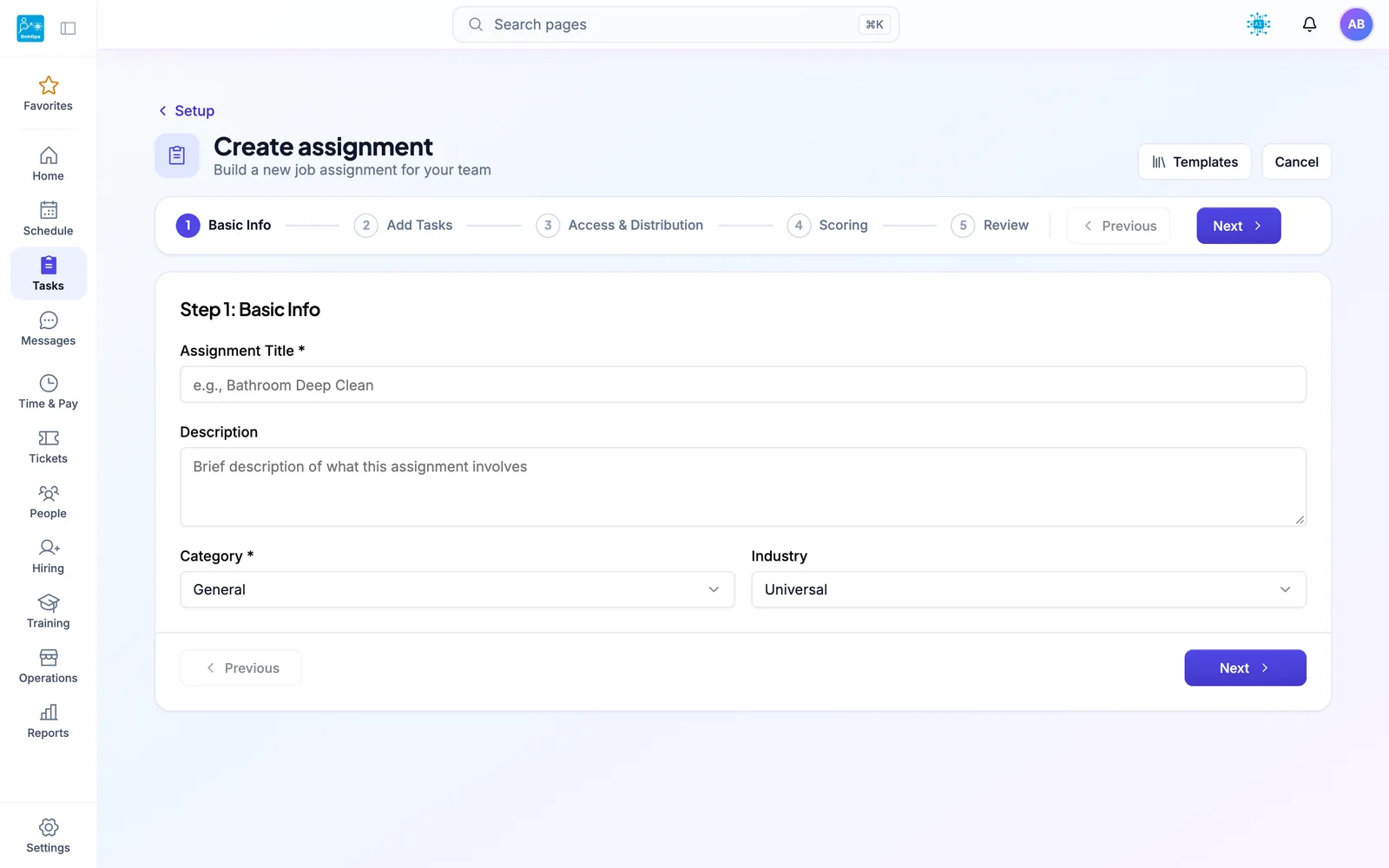
TASK BUILDER — Build line checks, food-safety logs, and opening duties with photo verification and point values in minutes
QSR scheduling and operations: FAQ
Your next lunch rush can run with full coverage.
30-day free trial, no credit card. Add your stores, set up positions and build your first week's schedule in under an hour. Or book a 15-minute walkthrough with our team. Running one store? After the trial, stay on DohOps Free: one location, up to 8 users, free for your first 6 months.