Build the week's schedule in under 10 minutes.
 AI Assistant at the core
Drag-drop shifts, auto-read employee availability, copy an entire week across locations, and see live labor costs as you build — before you publish a single shift. Scheduling that fits how multi-unit operators actually manage people.
What's inside Smart Scheduling
Every tool a multi-unit operator needs to staff right — without the spreadsheet.
Drag-drop shift builder
Click any cell in the weekly grid, enter the shift time, position, and location, and drag it to another day or employee. No forms to fill, no save buttons to hunt. The visual schedule updates in real time so you always see exactly who is working where.
Availability & time-off management
Employees submit recurring weekly availability — mornings, evenings, weekdays only, no Sundays. Time-off requests flow through a manager approval queue. Both sync automatically so you never schedule someone against their own constraints.
Pattern templates
Save any week as a named template — 'Standard C-Store Week', 'Holiday Staffing', 'Grand Opening Push'. Apply a template to any future week at any location in seconds. For operators running the same shift pattern every week, templates eliminate schedule-building almost entirely.
Copy-week across locations
Clone an entire week's schedule — every shift at every location — and paste it forward one or multiple weeks at once. Use it for routine weeks at stable locations or as a baseline to adjust before publishing.
Live labor-cost tracker
As you add and move shifts, the budget bar updates: total hours, overtime hours, projected payroll cost, and labor as a % of sales target. Catch the week that hits 38% labor before you publish it — not after you sign the payroll check.
PDF & Excel export
Export any week's schedule to a printable PDF for break-room posting or an Excel file for store managers. Employees with the app see their shifts automatically; everyone else gets the export their way.
Built for multi-unit reality
A 30-year multi-unit franchise operator built this. Every feature solves a problem that cost real money before the fix existed.
Multi-location grouping
The weekly view groups employees by location — LaFrontera, Lamar & Runberg, the hotel — in a single screen. Switch to 'All Stores' or drill to one location in seconds. No tab-switching, no separate logins per store.
Week-start flexibility
Set your pay week to start Sunday, Monday, or Friday — whatever your franchise agreement requires. The schedule, overtime calc, and payroll export all align to the same anchor. No reconciliation between scheduling and payroll cycles.
Open-slot visibility
The budget bar flags open slots — positions that need covering but have no one assigned. See the gap the moment it appears, not when the shift goes unmanned at 6 AM on a Tuesday.
Wage-visibility toggle
Toggle wages on or off while building the schedule. Keep hourly rates private when a store manager is looking over your shoulder, then turn them back on to validate that the week's cost lands inside budget before you publish.
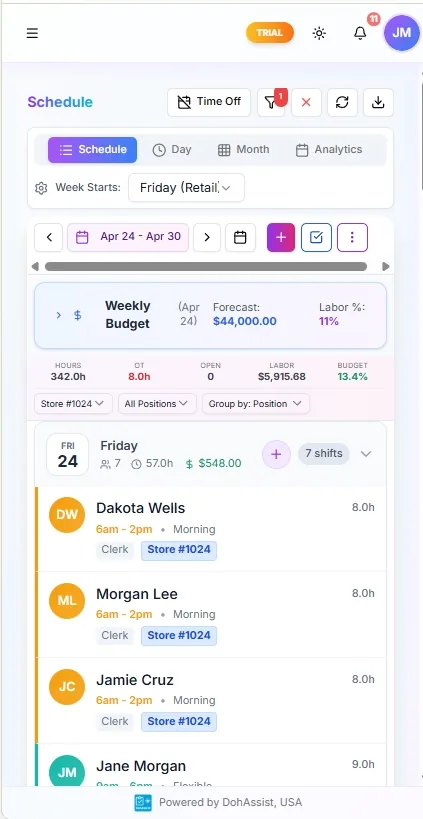
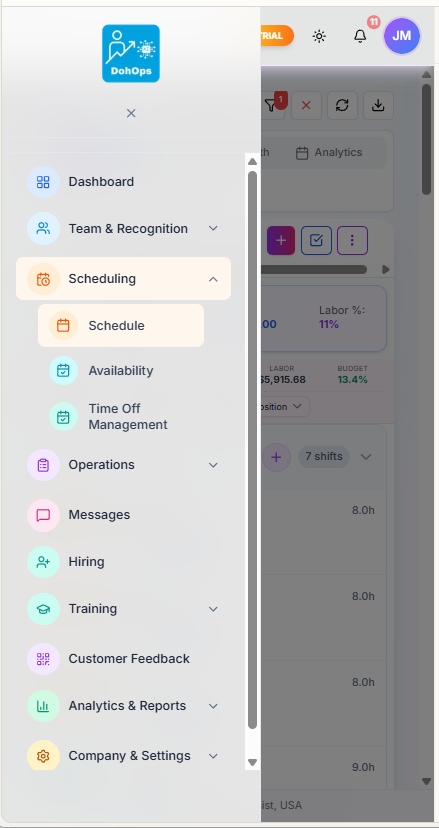
SMART SCHEDULING — Live mobile schedule with labor forecasting and in-app navigation
What changes in week one
Day 1. You add your locations and import your employee roster. Set each employee's wage, position, and location assignment. Turn on availability collection — every employee gets a prompt to submit their weekly preferences. You build your first schedule in the drag-drop grid and publish it.
Day 3. Two employees have submitted availability conflicts for next week. The system has flagged both automatically — you resolve them in the approval queue instead of fielding calls. You also notice the Wednesday night shift at your c-store has 38% labor because one employee's rate is higher than expected. You catch it before the week runs.
Day 7. You save the week as a template — 'Standard Store Week — January'. Next week takes four minutes: apply the template, adjust for one time-off request, publish. The store manager stops texting you for the schedule at 11 PM on Sundays.
Day 30. You've built four weeks of schedules. Labor cost is running 2.3 percentage points lower than the same period last year. That gap is not an accident — it's what happens when you see overtime before it happens instead of after it's paid.
Smart Scheduling — FAQ
Stop building schedules the hard way.
30-day free trial, no credit card required. Set up your first location and build a week's schedule in 10 minutes — or book a walkthrough and see how operators with 5+ locations use templates and copy-week to schedule an entire portfolio in under an hour.