Gas station operations built for operators who run more than one site.
 AI Assistant at the core
DohOps is a gas station workforce and operations app: schedule 24/7 coverage across your sites, clock in on a shared kiosk, prove pump, delivery and store checks with photos, and log deliveries with their invoices. Built by an operator who owns gas stations. $99/month for unlimited locations with 8 users included ($8 per extra user), DohOps AI included, set up in under an hour.
See DohOps run a gas station store
Click through a week with sample data: DohOps AI drafting a week of open shifts, overnight clerks, fuel pump and roller grill checklists, hours for payroll and hiring.
Sample data with made-up names. Open the tour in a new tab →
How DohOps fits a gas station operation
Six ways DohOps maps to the daily reality of running a fuel-and-store operation.
Pump and forecourt checks
Ready-made checklists for the fuel pump area, restrooms, roller grill, coolers and coffee station, plus any check you add, such as the price sign or an island walk. Each one includes photo proof, and every hand-in is time-stamped.
Fuel delivery checklists
Build a delivery checklist with the steps your supplier and brand expect (tank readings before and after, spill kit, signed receipt), each with a photo, and log the invoice with a photo or PDF that DohOps AI reads.
Cash drop and register checks
Use the ready-made register reconciliation checklist or build your own safe-drop checklist, with a photo and time stamp for each drop. Managers see every site's checks from one inbox.
Kiosk and GPS clock-in
A shared kiosk tablet with private PINs at each site, which can be limited to that site's own network, plus phone clock-in with a GPS radius check that can flag or block clock-ins from outside it.
Shift handover checklists
Build a handover checklist (lottery and tobacco checks, key log, safe count) that the outgoing clerk completes with photos before the next shift starts.
Labor against your target
Set a labor target % for each site and enter your inside sales. DohOps compares scheduled and actual labor with that target and alerts you when a site goes over budget.
Audit every site the same way, and get the misses fixed
Store audits with the ready-made Convenience store walk, a fix-it task with an owner and a due time, and marks on photos that show exactly what to fix.
Store audits for the forecourt and the store
Start from the ready-made Convenience store walk, which includes an “Outside and fuel” section, or build your own weighted checklist. Each item is Pass, Fail or N/A or scored in points, with photos and notes, and key items can be marked Critical. DohOps works out the score, answers lock when you submit, and you see every site's score and trend.
A fix-it task for every miss
Reject a checklist or send it back with the fix-it tick on (it is on by default) and DohOps opens a ticket for that site, such as “Fix: Fuel Pump Area Cleaning”, with your reason, due in 24 hours and assigned to the store manager and assistant manager. Each audit miss can make one too, and closing it takes a short note.
Marks on photos
When you review a hand-in, circle the spill by pump 4 or draw an arrow at the empty squeegee bucket and add a short note. The clerk sees your marks with the decision or the send-back, so there is no guessing what to fix. The original photo is never changed.
What you can check in your first week
What you can see in DohOps within days of starting the free trial. No made-up results, just what the app shows you.
Every pump and restroom check, with photos
See which forecourt and store checks were done at every site, by whom and when, from one Review Inbox.
Who covered the overnight
One schedule for every site with AM, PM and overnight presets, and the clock-vs-schedule report showing who came in early, late or stayed.
Deliveries and invoices in one list
Each delivery with its invoice photo, what DohOps AI read from it, and any vendor credit you are owed.
Applicants from the pump island
QR-code applications from every site land in one list with their answers.
The pain we built this for
A gas station is two businesses on one lot. Fuel brings people in on a thin margin; the store is where you make money. Both run around the clock, with overnight clerks, fuel deliveries at 6 AM and a crew that turns over faster than you can train it.
Many multi-site operators keep delivery logs in binders, cash drop records on paper and the schedule in a group chat. When a brand inspector or a cash shortage shows up, you are either hunting for the binder or you have a time-stamped photo record ready. DohOps is the second option.
DohOps was built by Vikas Sharma, a multi-unit operator who has spent 30 years turning struggling stores and hotels into top performers. He is a member of 7-Eleven's NBLC and ZLC and a former President of the Greater Austin 7-Eleven Franchise Owners Association, and his own stores run on DohOps today: see the numbers in the case study.
At $99/month for unlimited locations, with 8 users included and $8 for each extra user, there is no per-location fee: a new site adds nothing to the bill except any extra users. DohOps AI is included.
The core modules for gas station operators
Three modules that cover the fuel-and-store day, at every site.
AI Job Assignments
Pump, restroom, delivery and store checks with photo proof. DohOps AI can score them and your manager makes the final call, without you standing in the lot.
Time & Attendance
Kiosk PIN clock-in at each site, phone clock-in with a GPS radius check, overtime added up across sites, and a 7-year audit trail.
Smart Scheduling
Overnight coverage, AM and PM presets and weekend peaks in one schedule that goes to everyone's phone, with a reminder an hour before each shift.
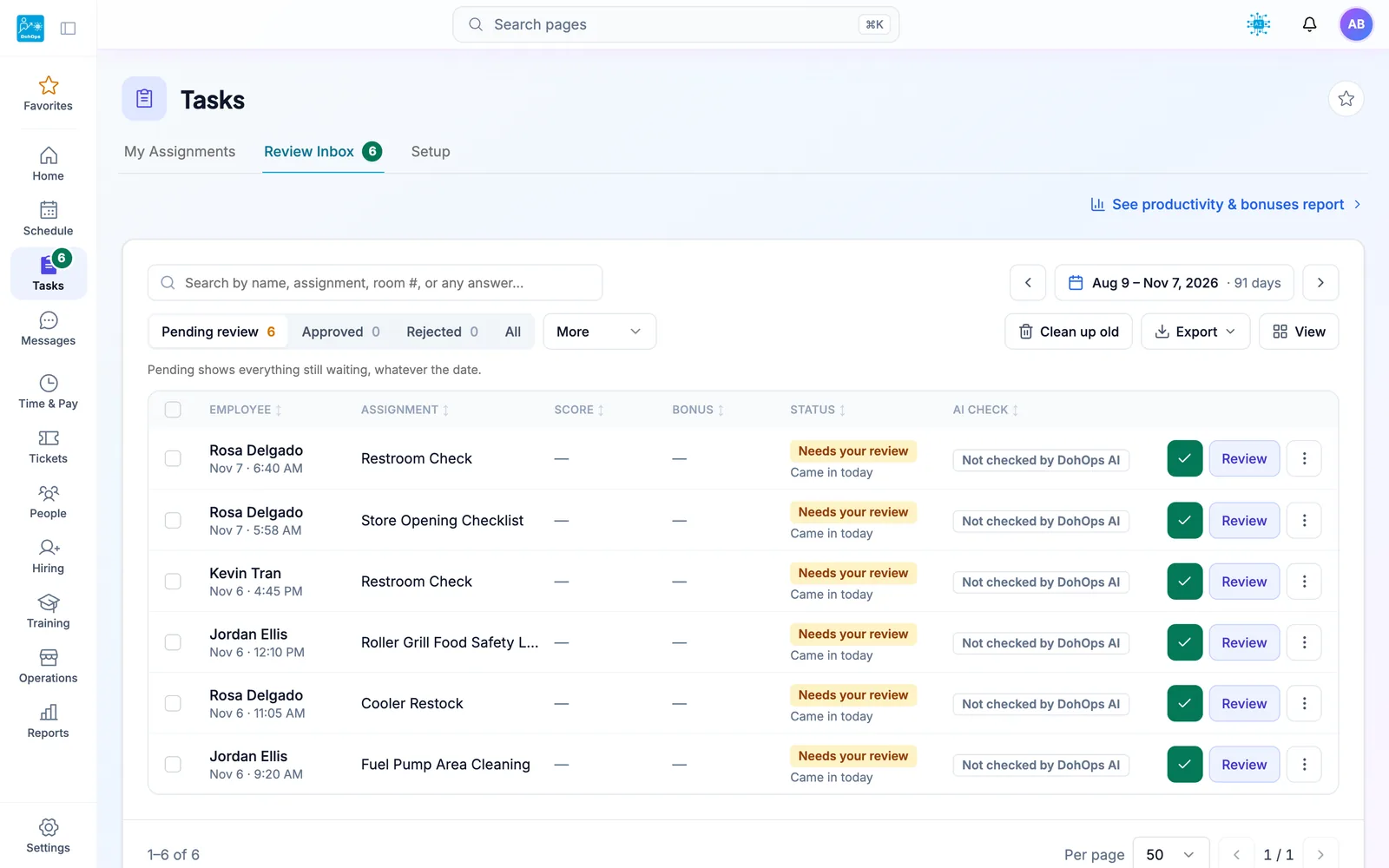
REVIEW INBOX — Pump-island cleaning, restroom checks and cooler restocks come back with photos for a manager to approve
Gas station operations: FAQ
Your fuel delivery log should be on your phone, not in a binder.
30-day free trial, no credit card. Add your sites, pick your pump and store checklists, and build your first shift schedule in under an hour. Or book a 15-minute walkthrough. Running one station? After the trial, stay on DohOps Free: one location, up to 8 users, free for your first 6 months.