Restaurant scheduling built for FOH, BOH, and everything between.
 AI Assistant at the core
DohOps is a restaurant scheduling and operations app for multi-unit full-service operators: schedule front and back of house by position, clock in on a shared kiosk, prove line checks, temperature logs and side work with photos, and log food waste and deliveries. $99/month for unlimited locations with 8 users included ($8 per extra user), DohOps AI included, set up in under an hour.
See DohOps run a restaurant
Click through a restaurant week with sample data: DohOps AI drafting open shifts for the dinner rush, line checks on the crew's phones, cooler logs, hours for payroll and hiring.
Sample data with made-up names. Open the tour in a new tab →
How DohOps fits a full-service restaurant
Six ways DohOps maps to the two-floor reality of running a casual-dining portfolio.
FOH and BOH scheduling by position
Schedule servers, hosts, runners, line cooks, prep and dish by position, and see both sides of the house in one view before the dinner rush. Copy last week or apply a saved template, then publish to phones.
Line checks and temperature logs
Ready-made restaurant checklists: line check, a temperature log every 4 hours with a thermometer photo, fryer oil, date-and-label (FIFO), prep list and opening and closing duties, each with photo proof.
Side work and closing duties
Give servers their side work and closing list as a checklist on their phone, with a photo for each step. Managers review the photos in one inbox, and a checklist rejected or sent back with the fix-it tick on (the default) becomes a fix-it ticket for the location, due in 24 hours.
Food waste and deliveries
Log food waste with a photo and export it. Log each delivery with a photo or PDF of the invoice; DohOps AI reads it and a person confirms. Report items out of stock and send order requests for approval.
Labor against your target
Set a labor target % for each location and enter sales. DohOps compares scheduled and actual labor with that target and alerts you when a location goes over budget.
Hiring with a QR code
Post a job with a QR code at the host stand. People apply from their phone without an account, every location's applicants land in one list, and DohOps AI can draft the posting.
Audit every location the same way, and hear from your crew
Store audits with the ready-made Restaurant walk, a fix-it task for every miss, and Pulse surveys for both sides of the house.
Store audits: the Restaurant walk
Start from the ready-made Restaurant walk or build your own weighted checklist. Each item is Pass, Fail or N/A or scored in points, with photos and notes, and food-safety items can be marked Critical. DohOps works out the score, answers lock when you submit, and you see every location's score and trend. A location's manager can audit their own location between your visits.
A fix-it task for every miss
Each audit miss can make a fix-it ticket for the location, and so can a checklist rejected or sent back with the fix-it tick on (the default): the reason, due in 24 hours, assigned to the location's manager and assistant manager. Closing it takes a short note.
Pulse surveys for FOH and BOH
Send 1 to 5 quick questions to a position, a department or a location, named or anonymous. Staff get a notification and a card on My Tasks. Anonymous answers are kept with no name, location or time, and results show only after the survey closes with 3 or more answers. A named survey shows who has not answered yet.
What you can check in your first week
What you can see in DohOps within days of starting the free trial. No made-up results, just what the app shows you.
Both sides of the house, by position
One schedule showing servers, hosts, runners and the line by position, so a short Saturday is visible on Thursday.
Every line check, with photos
Line checks, temperature logs and closing duties come back with photos and time stamps, in one Review Inbox.
Who clocked in early, late or stayed
The clock-vs-schedule report shows early clock-ins, late arrivals and people who stayed past their relief, location by location.
Food waste in one list
Every waste entry with its photo, ready to export, instead of a clipboard in the walk-in.
The pain we built this for
Full-service restaurants run two workforces under one roof: front of house and back of house, with different positions, pay rates and rhythms. A server who calls out costs you table coverage; a prep cook who calls out costs you the menu. Schedule them as one pool of shifts and one side of the kitchen is always a surprise.
Food safety is the quiet risk. Temperature logs, fryer oil changes and date labels are easy to skip and hard to prove. DohOps can ask for a photo at each step, so the log shows what was actually done when the health inspector arrives.
Side work and closing duties are the other leak. When the closing list lives on a clipboard, nobody can say who skipped the salt shakers or left the line dirty. A checklist with a photo for each step settles it the next morning.
DohOps was built by Vikas Sharma, a multi-unit operator who has spent 30 years turning struggling stores and hotels into top performers. He is a member of 7-Eleven's NBLC and ZLC and a former President of the Greater Austin 7-Eleven Franchise Owners Association, and his own stores run on DohOps today: see the numbers in the case study.
One honest note: DohOps does not calculate tips, tip credits or tip pools, and it does not connect to your POS. Keep those in your POS and payroll provider; DohOps handles the schedule, the time clock and the work. $99 a month covers unlimited locations and 8 users, with $8 for each extra user and DohOps AI included. One bill, one login, every store on the same system.
The core modules for restaurant operators
Three modules that cover both sides of the house, every day.
AI Job Assignments
Line checks, temperature logs, side work and closing tasks, all with photos and time stamps. DohOps AI can score the photos and your manager makes the final call.
Smart Scheduling
FOH and BOH by position, availability and time off in the app, saved weekly templates, and one view of every location.
Time & Attendance
Kiosk PIN or phone clock-in with a GPS radius check, weekly and daily overtime, CSV, Excel or PDF exports for payroll, and a 7-year audit trail.
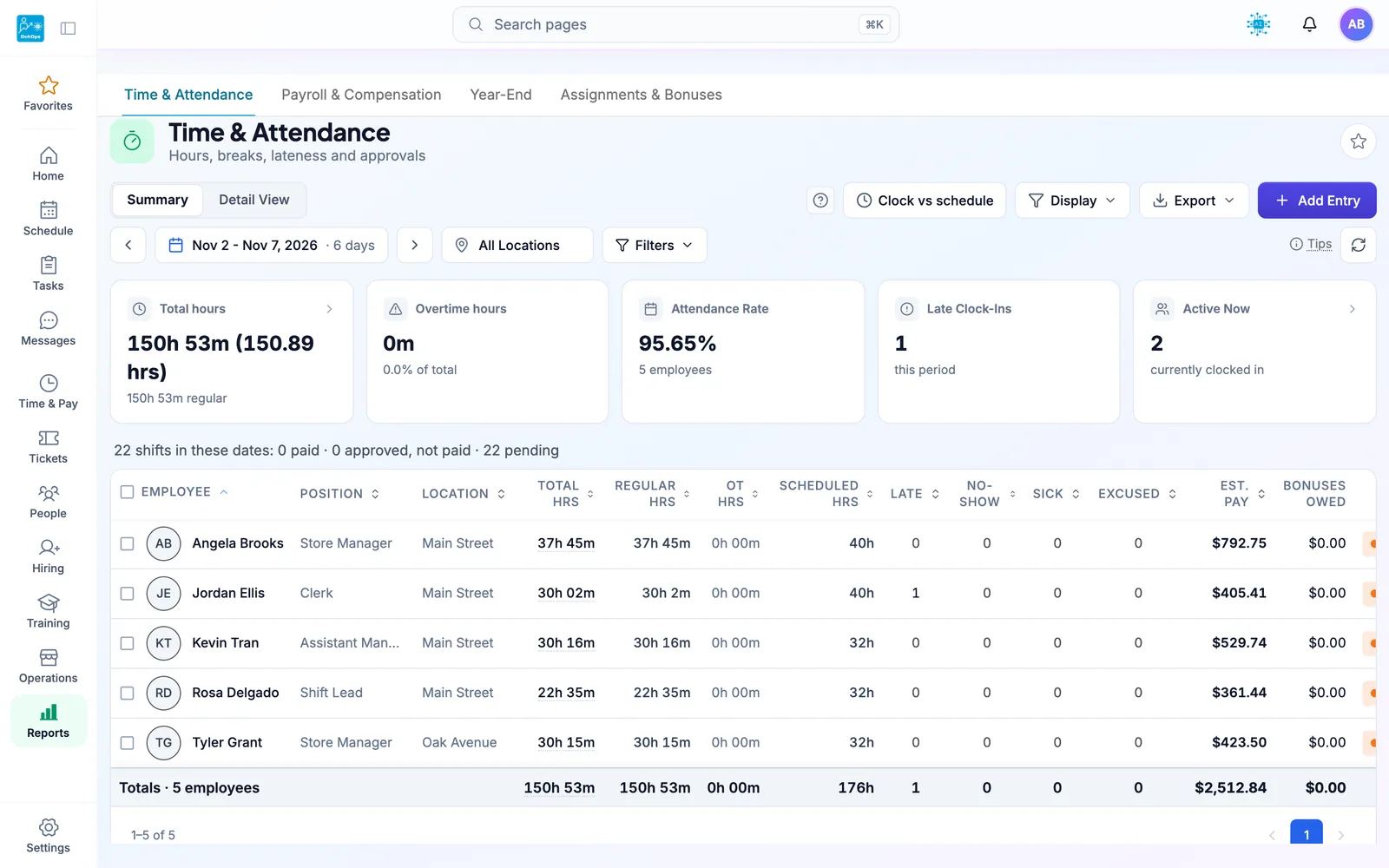
TIME & PAY — FOH and BOH hours, late clock-ins and estimated pay on one weekly report
Full-service restaurant operations: FAQ
Both sides of the kitchen covered. One bill.
30-day free trial, no credit card. Build your FOH and BOH schedule, pick your line check and temperature log checklists, and publish your first week in under an hour. Or book a 15-minute demo. Running one restaurant? After the trial, stay on DohOps Free: one location, up to 8 users, free for your first 6 months.