Retail staffing and resets for operators who run more than one location.
 AI Assistant at the core
DohOps is retail workforce management for multi-location operators: schedule every store in one place, staff resets and floor sets with a photo for every section, hire from a QR code, and keep labor against your target. $99/month for unlimited locations with 8 users included ($8 per extra user), DohOps AI included, set up in under an hour.
How DohOps fits a retail operation
Six ways DohOps maps to the merchandising, staffing and labor reality of a multi-location retail portfolio.
Reset and planogram checks
Attach the planogram or a photo of the finished section as the example for each step. The crew sends a photo when each section is done; DohOps AI can compare it with the example, and a manager approves from the Review Inbox.
Staffing resets across locations
Schedule reset crews as shifts at each location for reset week, save the week as a template to reuse, and see who is working where in one view.
Labor against your target
Set a labor target % for each store and enter sales. DohOps compares scheduled and actual labor with that target and alerts you when a store goes over budget.
Floor set and recovery checklists
Opening, closing and recovery checklists with a photo for each zone, assigned to the right people with a reminder before they are due, and visible for every location from one screen.
Seasonal hiring
Post jobs with a QR code in the store. Applicants apply from their phone without an account and land in one list for every location. DohOps AI can draft the posting, and training courses go out with due dates.
Multi-location roster
Every location in one schedule, people who work at more than one store, store managers who only see their own store, and CSV, Excel or PDF exports for payroll.
Audit every store the same way, and get the misses fixed
Your own weighted store audit, a fix-it task with an owner and a due time, and marks on photos that show exactly what to fix.
Store audits, built your way
Build your own weighted audit checklist for a store visit: windows, displays, fitting rooms, stockroom and signage. Each item is Pass, Fail or N/A or scored in points, with photos and notes, and key items can be marked Critical. DohOps works out the score, answers lock when you submit, and you see every store's score and trend. A store manager can audit their own store between your visits.
A fix-it task for every miss
Each audit miss can make a fix-it ticket for the store, and so can a reset or recovery checklist rejected or sent back with the fix-it tick on (the default): the reason, due in 24 hours, assigned to the store manager and assistant manager. Closing it takes a short note.
Marks on reset photos
Circle the wrong facing or draw an arrow at the missing price sign on the crew's photo and add a short note. The employee sees your marks with the decision or the send-back, so they know exactly what to fix. The original photo is never changed.
What you can check in your first week
What you can see in DohOps within days of starting the free trial. No made-up results, just what the app shows you.
Every reset section, with photos
See which sections are done at every location, with the photo for each one, before you leave the first store.
Who is working where
One schedule for every store, with labor cost shown as you build it and labor against target once you enter sales.
Applicants from every store
QR-code applications from every location land in one list with their answers.
Closing and recovery, proven
Closing and recovery checklists come back with photos, so the opening shift is not the first to find out.
The pain we built this for
Multi-location retail has a job most industries do not: every store is supposed to look the same. Resets, floor sets, seasonal changeovers and weekly recovery decide whether a customer sees your brand or a cluttered shelf. Without a photo for each section, you are taking the store manager's word for it, and the store manager is busy covering a call-out.
A reset needs extra hands on a set day, a clear split of who does which section, and proof that each section matches the plan. DohOps puts all three in one place: the reset crew is scheduled as shifts, each section has an example photo, and each finished section comes back with a photo you can approve from your phone. The same works for convenience store resets.
Labor is the line you can control. Set a target for each store, enter sales, and DohOps shows scheduled and actual labor against it and alerts you when a store goes over, so you can fix the schedule before the month closes. DohOps does not connect to a POS or door counter, so staffing for traffic stays your call, made with the numbers in front of you.
Seasonal hiring is where retail operations break down. A QR code at the register, one applicant list for every store, training courses with due dates and a schedule published to phones keep the holiday ramp in one app instead of five.
The core modules for retail operators
Three modules that cover resets, staffing and seasonal hiring.
AI Job Assignments
Resets, floor sets, recovery, opening and closing checklists, with a photo for each step. DohOps AI can compare photos with your example and a manager decides.
Smart Scheduling
Every location in one view, reset crews and promotional weekends scheduled as shifts, labor cost as you build, and schedules on everyone's phone.
Hiring & Onboarding
QR-code apply in-store, one applicant list for every location, an AI posting writer and training courses before the first shift.
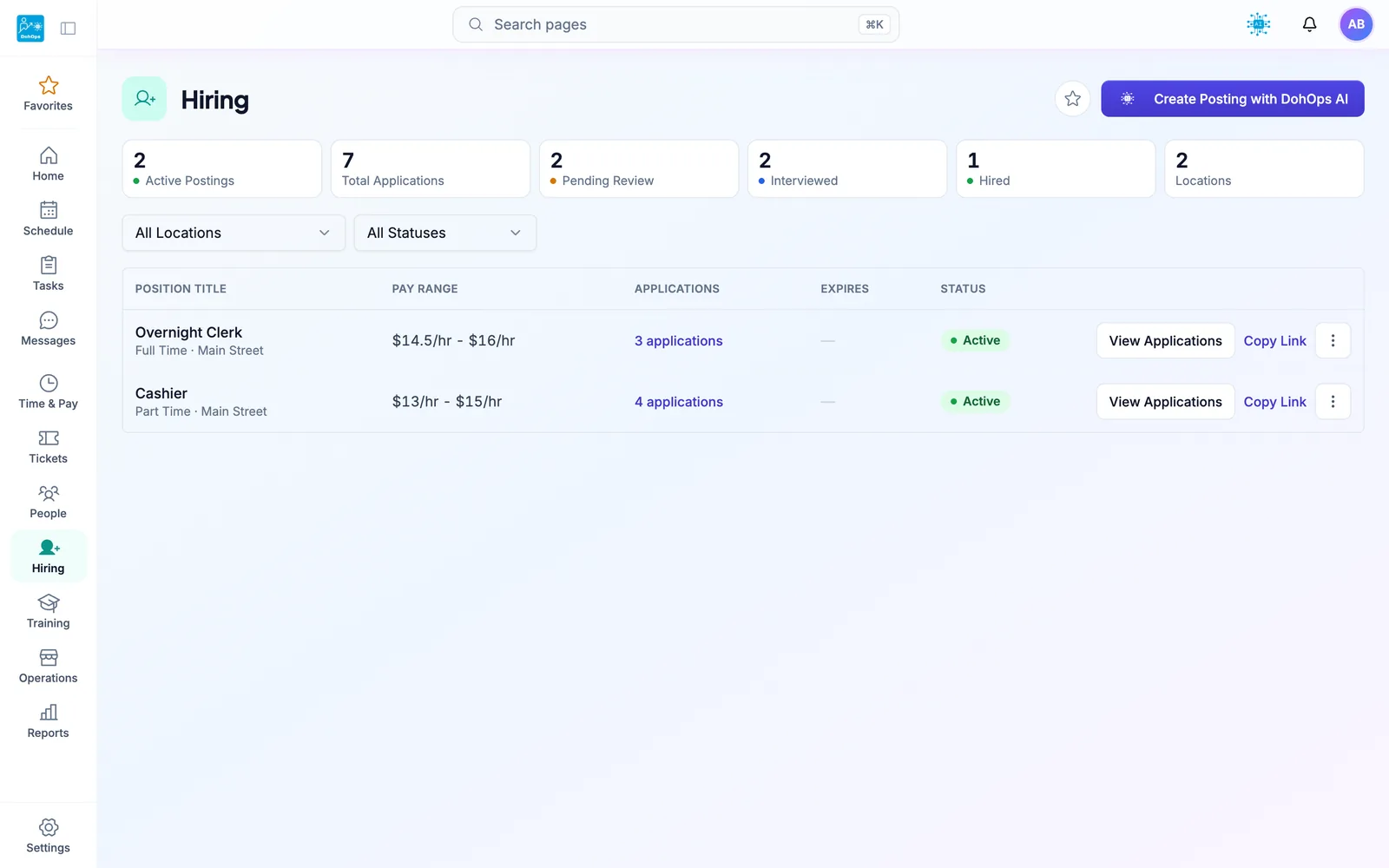
HIRING PORTAL — Post and manage every open retail position with pay ranges, job types, and application tracking in one place
Retail staffing and operations: FAQ
Every location should look the same. Now you can verify it.
30-day free trial, no credit card. Add your locations, build your reset and recovery checklists, and publish your first schedule in under an hour. Or book a 15-minute demo. Running one store? After the trial, stay on DohOps Free: one location, up to 8 users, free for your first 6 months.