The checklist that checks itself.
 AI Assistant at the core
DohOps is the only workforce platform that uses AI to score photo proof of task completion — before the manager ever opens the inbox. Recurring shift checklists, photo verification, AI quality scoring, and vertical templates built for the way convenience stores, QSR, and hotels actually run shifts.
What's inside AI Job Assignments
From shift checklist to photo-verified, AI-scored, manager-approved — in one platform.
Photo-verified task completion
Employees photograph their completed work — stocked cooler, clean prep station, set hotel room — and submit it directly in the app. The AI evaluates the image against the task's criteria and scores it before the manager sees it. No other workforce platform scores the photo. This is the reason operators stop chasing people down to confirm tasks were actually done.
AI quality scoring
Each submission receives a numerical score (e.g., 78/95) based on how well the photo meets the task criteria. Submissions below the threshold are auto-flagged. Managers spend their time on the exceptions — the 2 or 3 that need judgment — not on the 40 that are clearly done right.
Recurring & on-demand assignments
Schedule assignments to push automatically — 6 AM opening checklist, 2 PM changeover, 10 PM close. Or make them on-demand for tasks employees complete at their own pace during a shift. Either way, the assignment appears in the employee's queue without any manager touching it.
Vertical template library
Pre-built templates for convenience store AM/PM shifts, end-of-day procedures, QSR food prep, hotel room inspections, and more. Deploy a complete shift-checklist system in under an hour. Every template is fully customizable to match your franchise's exact brand standards and inspection criteria.
Operations Command Center
One inbox for all assignment submissions across every location. Filter by status (Pending, Approved, Rejected, Flagged by AI), by location, by employee, or by assignment. See who submitted, when, what score, and whether a bonus was triggered — without switching screens or digging through emails.
Bonus integration
Connect assignment scores directly to the bonus engine. Employees who hit score thresholds automatically trigger a bonus calculation — no spreadsheet, no manual tallying. The performance loop closes itself: do the work, photo-verify it, AI scores it, manager approves it, bonus is issued.
Built for multi-unit reality
Most operators run 3-10 locations. What breaks them isn't the work — it's the invisible work that never gets confirmed. DohOps was built to fix that.
No other app scores the photo
When I Work, Homebase, Deputy, 7shifts — they all accept photo attachments on tasks. None of them evaluate the photo. DohOps AI reads the image and scores it. That's the gap between "employee claims it's done" and "we have evidence it meets standard."
Franchise audit readiness
Every completed assignment stores the photo, the AI score, and the manager approval with timestamp — indefinitely. When a franchisor auditor asks what was completed on a given shift at a given location, you pull a filtered export in 30 seconds instead of hoping someone filed a paper checklist correctly.
Cross-location consistency
The same assignment template — with the same AI scoring criteria — runs at every location. Store 1 and Store 5 are held to exactly the same standard. When one location consistently scores 15 points lower on closing checklist, the data tells you where to focus coaching before the franchisor visit does.
5-minute morning review
Most operators run their entire multi-location assignment review in under five minutes because the AI has pre-cleared the routine submissions. They see three flagged items, approve two, reject one with a note, and move on. That's what 3-5 hours saved per week actually looks like in practice.
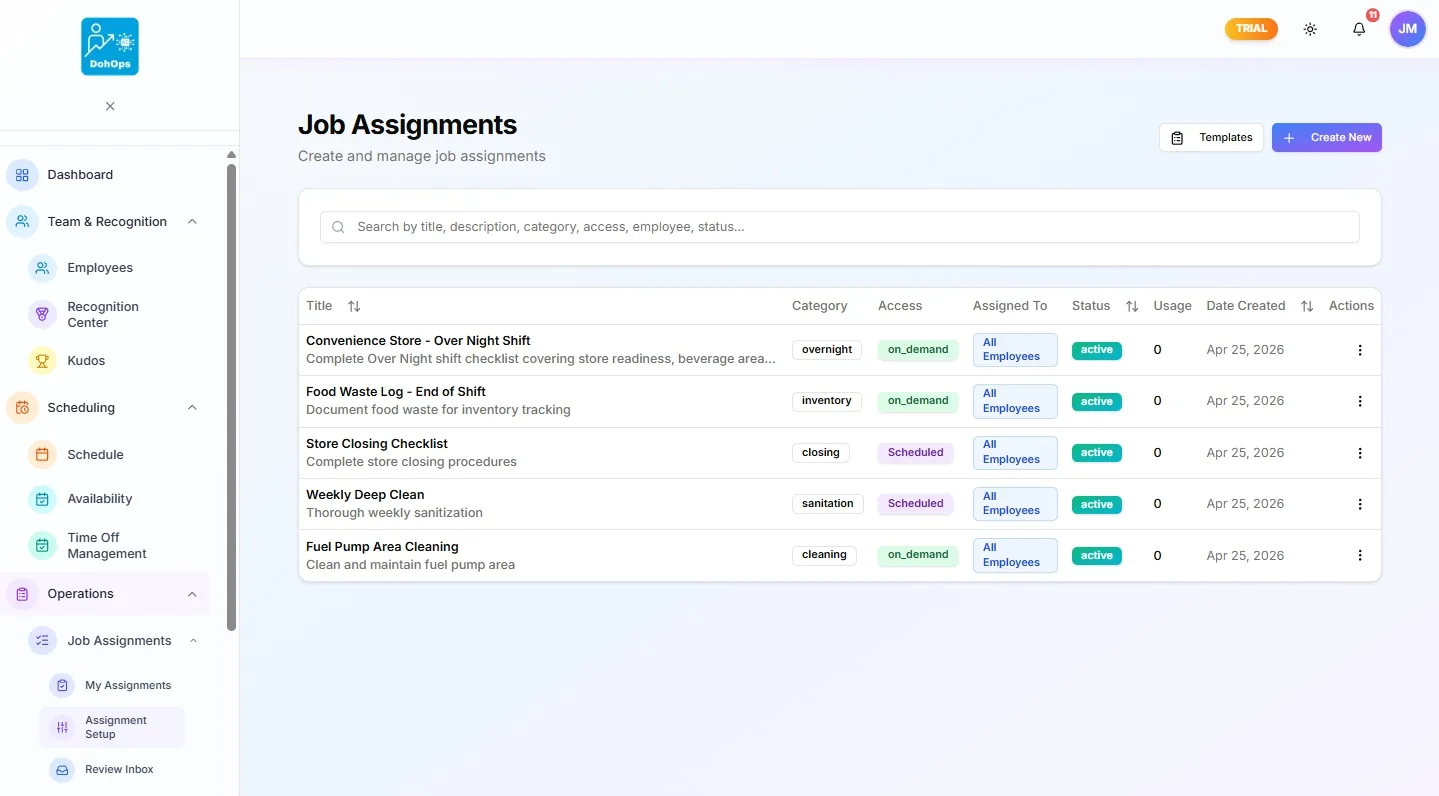
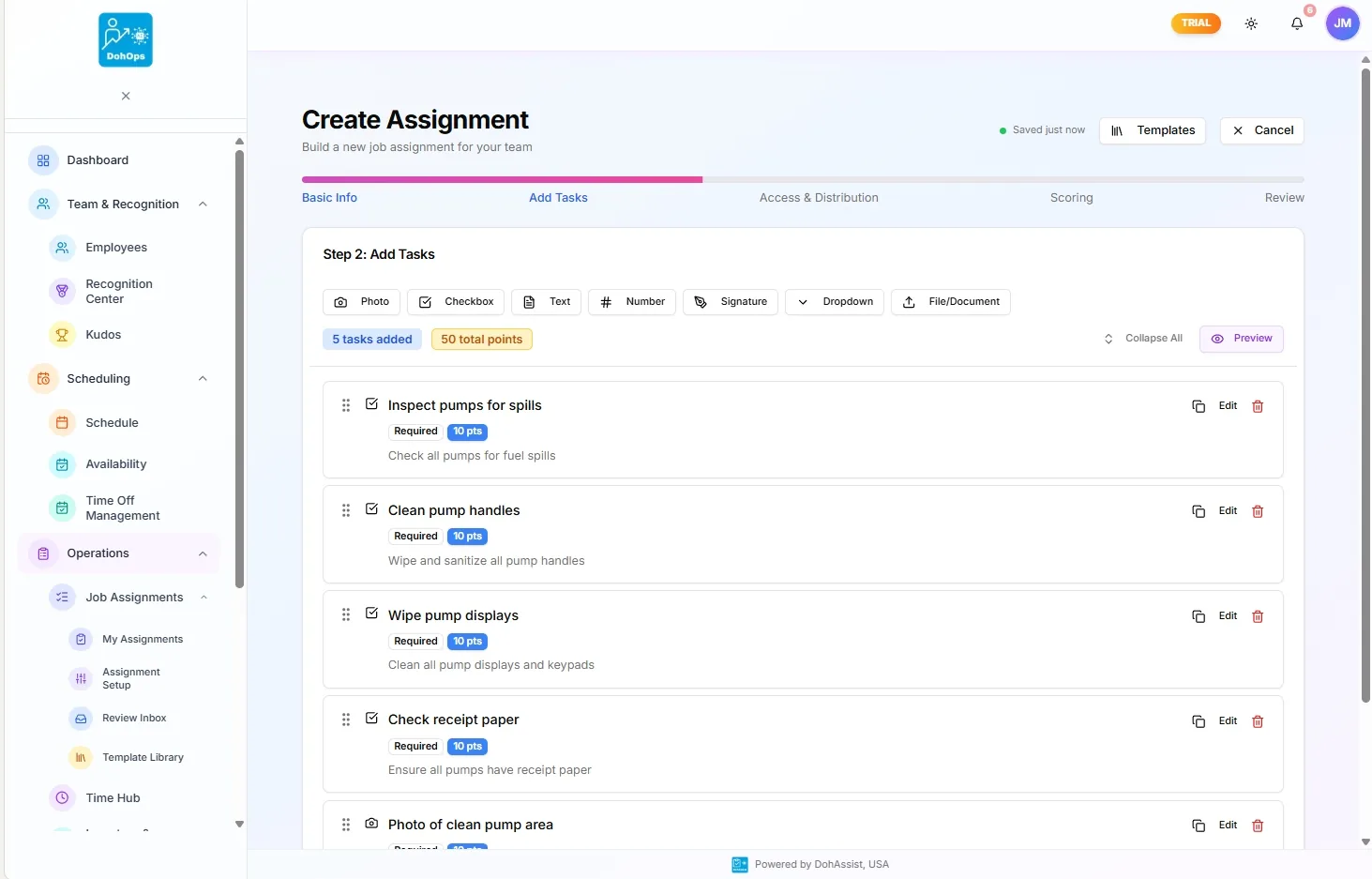
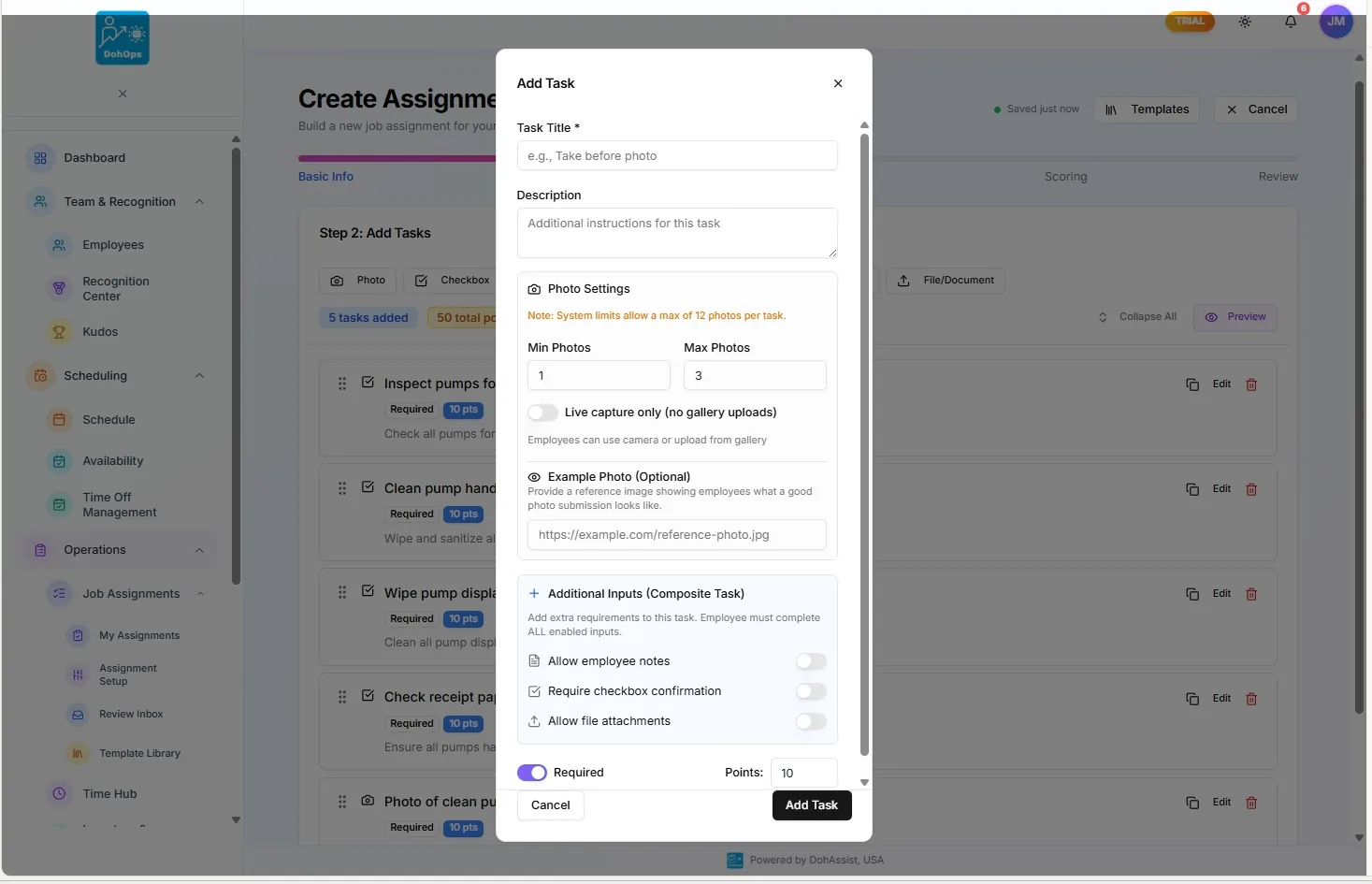
JOB ASSIGNMENTS — Assignment list, task builder wizard, and photo-verification task settings
What changes in week one
Day 1. You browse the Template Library and deploy the convenience store AM and PM shift checklists. Both are live at all locations within the hour. Employees see their assignment queue the next morning when they clock in.
Day 3. The first 48 hours of submissions are in. The Operations Command Center shows 92 submissions: 84 approved by AI automatically, 6 flagged for manager review. You open the flagged queue — three are genuinely incomplete (beverage station not stocked, floor not swept), three are marginal (AI scored them 68/95, just below threshold). You approve the marginals with a note and reject the three clear fails. Total review time: 7 minutes.
Day 7. You notice Store 3 consistently scores 18 points lower on the opening checklist than Stores 1 and 2. The data shows it's always the same two employees on the same shift. You schedule a coaching conversation with the store manager — you have the evidence, not just a feeling.
Day 30. The franchise audit is in six weeks. Your operations manager pulls the assignment completion report — 94% completion rate across all locations, photo evidence for every submission, AI scores archived. The prep meeting that used to take a full day takes 45 minutes.
AI Job Assignments — FAQ
See what AI-scored task verification actually looks like.
30-day free trial, no credit card. Deploy the convenience store shift checklist in your first session — or book a 15-minute demo and we'll show you the AI scoring interface live, including a real submission flagged and reviewed.